
v7.0.0.12 – 5 October 2026
Version 7.0.0.12
Released on: 5 October 2026
Type: Major Upgrade
Introduction
This is the first version with our new web application that was rewritten from the ground up. Job Profiling, Performance Management and Incident Reporting is still outstanding and will be released next year. This is our biggest upgrade in HR Manage’s 25 year history.
The new web application was developed on ASP.NET Core for .NET 10, the latest technology available.
Included in this version is the new platform for:
- Online Employee Management
- Workflows
- Document Signing
- Leave
Phase 2 (after version 7 released):
- Recruitment
Phase 3 (deferred to next major upgrade):
- Job Profiling & Performance Management
- Incident Reporting
General
Updated 3rd party components
Improved sign in performance
Dashboards are now loaded lazily after logging in instead of while logging in. This makes the system log in quickly while loading dashboards while the user can use the system already.
Dashboards on Windows application
- Legacy dashboards have been removed
- Clients can now choose between a fixed standard designed dashboard for each module or replace it with a custom BI designed dashboard.
- All dashboards will now make use of lazy loading and be loaded after the user has already logged in.
- BI Dashboard designs can now be exported and imported. Thus design can be done on QA and imported into Live.
Security
HR Manage now has MFA / 2FA (multi-factor authentication) built in and can be enforced for the Windows application, web portal or both. Users can also store their signatures on their profile to allow them to sign documents effortlessly.
Email Notifications
We are rewriting our email notification platform that is used for sending out email notifications based on actions and triggers in HR Manage. Up to now we’ve had fully customisable email notifications where clients can design their own email notification with an Html editor. We are replacing this model with new fixed email notifications where we only allow customising certain aspects of the notification.
The reason for this is so that we can allow for richer email notifications with more functionality. For instance when sending a leave application notification, since the email notifications will be generated programmatically, we’ll be able to include information like balances, list of other people on leave during the same period and even quick Approve and Reject buttons, all within the email.
We’ve also replaced the email client used for sending email notifications that allows for properly sending notifications over SSL.
AI Integration
Our first AI enabled version includes 7 areas of AI integration. The focus is on removing grunt work while leaving the decision making in the hands of the user.
Our first point for AI integration is in our Compliance module. Requirement Groups and Types can be configured with additional instructions for AI which can then be used to upload documents in a batch for an employee. The AI will figure out which document must be assigned to which Requirement Type and extract information like date issued, expiry date, comments and other custom fields.
Then we’ve also enabled AI for form design, in both the Forms & Workflows module as well as the Document Signing module.
Finally, we’ve added AI to our Importer to assist with initial configuration and lookup matching.
Licensing
The licensing has been upgraded to ensure that the license for subscription clients are kept up to date and that we receive accurate counts for monthly invoicing. This will help especially for self-hosted clients without internet access on their servers.
Web Application
New Features
Simpler Themes & Dark-mode support
Themes can now be designed by simply choosing between light and dark mode and then choosing an accent colour. For more advanced themes (should the client choose it), there is a dedicated theme designer where all aspects can be customised of the theme and the resulting css file can simply be dropped in the web application’s config folder.
Integrated Online Help
Access to the online help system is now integrated into the web application. Clicking the Help button on the top toolbar will navigate directly to the online help article for the current page.
Custom Filter Fields and Listing Columns
Like the Windows application, it is now possible to customise which filter fields and columns should be available on certain pages (i.e. browsing employees, workflows, etc.). We’ve also greatly improved the performance of browsing large amounts of records by using paging. Data will be retrieved from the server as the user switches between the pages, preventing scenarios where over 2000 records are being downloaded in extreme scenarios. Now you’ll only download what need use. So while switching between pages is now slightly slower than before, there is no upfront loading time for the page.
Leave Administration Module
We’ve upgraded this module to the new platforms, both Windows and on the new web application.
In the Windows application, leave can now be created in a batch with the help of the New Leave Wizard. While creating leave in batches was possible before, this interface will give more useful information like the balance for each employee, future balance, etc.
Leave rules are now also embedded into the leave records. For instance, in previous versions a rule would reject a newly created application and then recreate 2 split applications in its place. Now the system will simply create a single application that deducts credits from multiple types of leave. That means less clutter and simpler calculations.
Blocked Days
We’ve expanded the Leave Groups to now include Blocked days where people aren’t allowed to take leave. If an employee attempts to apply for leave over a period that includes one or more blocked days, the application will reject immediately.
New Web Interface
Applying for Leave
The Leave Application page is faster and more dynamic than before. New Balance calculations are instant as parameters are changed and rules like “Require attachment for x consecutive days” are automatically enforced. The Leave Planner is also more dynamic and modern, switching dates based on the date range selected with both Month and Timeline views available.
Leave Landing Page
The new leave landing page has been simplified consisting only of the balances, upcoming leave and a leave planner / calendar.
Approvals
Approving / Rejecting leave applications is now done in a batch without needing to first open the application. Clicking on the application on the list will expand the application so you can see the duration and effect on balances. It will also navigate the Leave Planner to the dates of the expanded application to see if there are any conflicts with other people.
Leave Runs
We’ve migrated away from the legacy way of doing leave runs at the end of the month / beginning of the following month to a new automatic daily leave run. The result is a system with up-to-date accruals that happen immediately when they’re supposed to.
We’ve also developed support for custom scenarios that allows accrual in non-standard ways like in the case of Sick leave: For new employees, accrue 1 day per month for the first 6 months and then provide full entitlement.
Compliance
- Requirement Type Editor
- Redone on the new platform with online help article available when pressing F1.
- Now includes additional fields for AI integration with a setting to determine the level of AI usage required: Disabled, Identification only or Identification with Field Extraction.
- Can also use AI to examine sample documents and write the AI instructions required for use in AI identification and extraction later.
- Requirement Group Editor
- The Change Log History can now be viewed.
- Employee Compliance section
- We’ve added a new tab called “Batch Upload”. Simply add or drag-and-drop multiple files to the window. You can then perform one of two actions:
- In the list / grid, specify which requirement type to assign each document to and complete the fields in the grid, or
- Click a button to let an AI agent identify, assign and complete the fields for you. This option will incur additional costs / credits for the AI agent that is not included in the monthly fee.
- We’ve also added a generic Batch Upload screen that is accessible from the Employee Manager. It works the same as the Batch Upload tab, but without any specific employee selected. When submitting the documents for processing, the AI will determine who the documents belong to and store it under the correct individual.
- We’ve added a new tab called “Batch Upload”. Simply add or drag-and-drop multiple files to the window. You can then perform one of two actions:
- Compliance Report (Advanced Reports)
- Fixed an issue where the report sometime provided a “duplicate key” error.
- Fixed an issue where training was still showing as “Expiring Soon” even though new training has been scheduled.
People Management Module
Employee File
We’ve upgrade the Employee File to the new web application. It now boasts a modern layout with more useful information and minimal navigation. Some new features include:
- All information from the previous page that span across multiple tabs are now neatly placed in the Overview tab
- The Personnel File tab shows the Relatives (editable), Compliance Documents that can be downloaded and Assets assigned to the employee.
- The Compliance tab gives a visual overview and detailed breakdown of compliance documentation and training.
- The Leave tab provides a visual overview of balances and leave applications.
- The Training tab provides a visual overview of current and past training.
Manage Sub-Ordinates
This page is now more than just a list of your sub-ordinates. It provides an overview of your sub-ordinates and things happening during the week (i.e. birthdays, anniversaries, upcoming leave, training, staff movements, etc.).
Browse Employees
For advanced users or managers with the applicable security, this allows users to browse all the employees that they have access to by specifying a filter to retrieve the requested employees. The specific filter fields and columns to be displayed can be customised by an administrator.
Compliance
This upgraded page allows managers to see the full compliance overview for their employees for both Document and Training compliance. See exactly who is compliant and who is not and who will soon become non-compliant due to expiring documents / training.
New Features
- Out of Office setting
- Users can now specify that they’ll be away or on leave until a certain date.
- If the Leave module is used, this will automatically be set when a person’s leave starts.
- The Leave system will use this setting to switch to secondary approvers when the primary approver is on leave.
- In future, the Workflow platform will also make use of this functionality.
Fixes
- Fixed an issue when customising the columns for IR Cases in the Employee Editor / Jump To area.
Organisational Charts
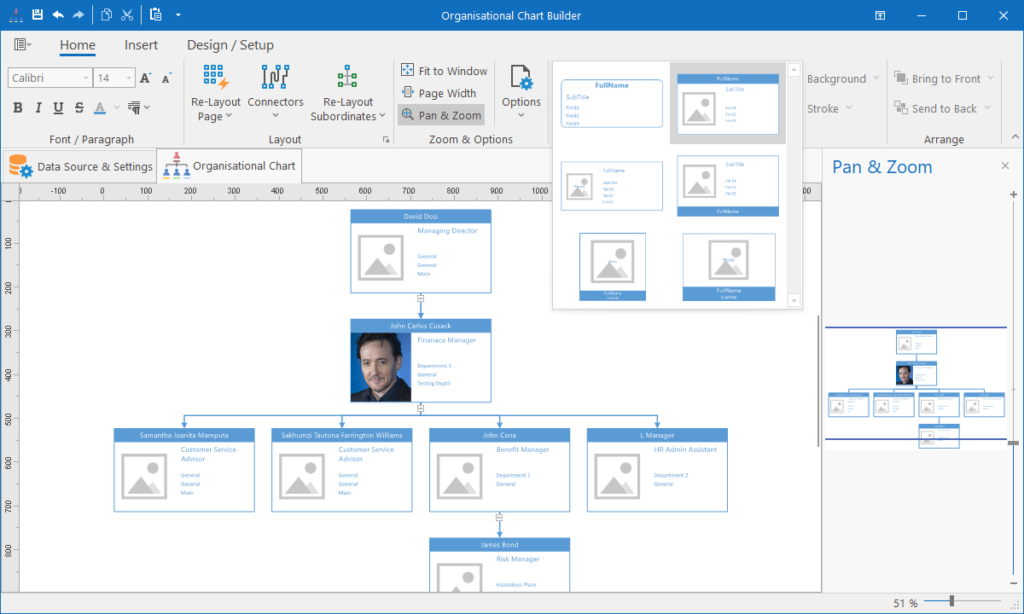
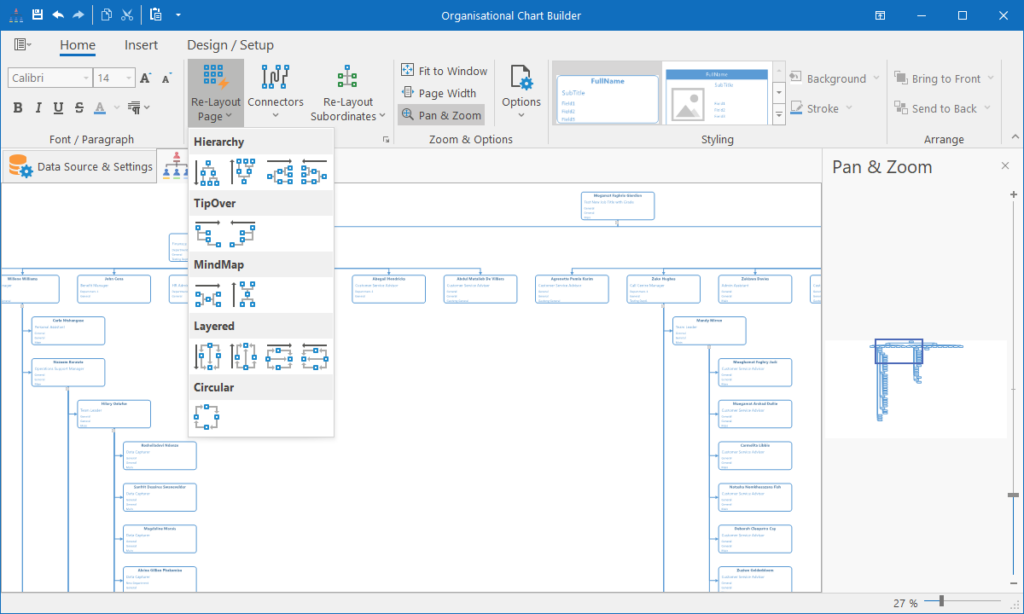
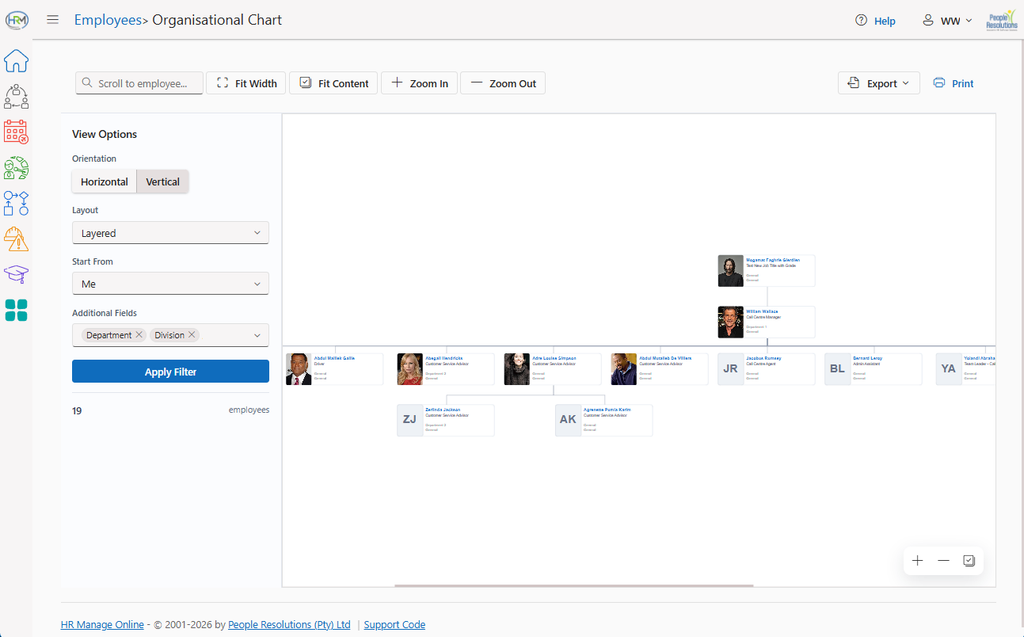
HR Manage now supports building various types of organisational charts. They are generated directly based on the links in the system and can be used to generate Org Charts for Positions, Employees and even Organisational Units. Various node styles are available and you can customise which fields should be included on the node and even if the employee photo must be included.
Nodes are expand-and collapsible, can be rearranged using automatic layout engines and the final generated diagrams can be exported to images or Pdf documents.
For ease-of-use, simply select an Employee in the Employee Manager or a Position in the Position Manager and click on the new Org-Chart from Here buttons.
Document Signing
Configuration / Setup
The Pdf Form Designer now has an invisible grid so that controls placed, resized or dragged on the page snaps to it. This makes it easier to better align controls.
We’ve also included an AI Form Builder. It will look at the available roles and attempt to build the form controls for each role based on what is required on the form. This can be done on forms with existing AcroFields or on flat PDF files.
Public Signing Portal
We’ve upgraded the online signing portal with new components that now ensures a smoother experience. Email notifications to HR Manage users will contain an extra link to allow them to authenticate automatically using their HR Manage login credentials, bypassing the email / OTP authentication and even preloading their signature for signing.
New Document Signing Activities
HR Manage now has 3 new types of Document Signing activities.
- External Document Signing: The current Document Signing activity gets renamed to External Document Signing. It remains as-is (with some upgrades).
- Formal Internal Document Signing: This will work exactly the same as the current External Document Signing activity, but all the signers must be able to access HR Manage to complete the signing. The document signing is embedded in HR Manage as part of the workflow, so no leaving to an external portal to sign.
- Informal Internal Document Signing: This is an informal document signing activity where the activity will simply open a pdf document and the user can place their signature anywhere on the document. It is quick to set up, but no advanced form filling and tracking available.
- Document Completion: This is actually not a document signing activity, but the new document completion activity. It allows users to complete a Word, Excel or Pdf file within the activity with the appropriate viewer. It can however be used for single document signing if the Pdf file contains an Acroform, the logged in user can complete and sign the form using the tools provided.
Version 7 also allows users to store their own signature and initials. It is encrypted and can only be used by the user themselves, saving time from uploading and drawing their signature every time they need to sign a document. The signatures also transfers to the external document portal.
Forms & Workflows
The forms & workflow module has undergone a major upgrade and this is technically the 3rd major iteration of this module.
Firstly, we’ve greatly improved the performance when browsing and navigating the workflows, especially in scenarios where there are thousands of open workflows. Browsing is divided into pages and each page retrieves its own data from the server instead of preloading all the workflows.
Then, the workflows can now be exported to a Pdf document containing a summary of the entire workflow, all the fields captured and details of each activity summarised.
New and Updated Activities
Version 7 upgrades the functionality on almost all types of workflow activities and introduces new ones. Most of the activities now support “automatic start” and can be enabled under the options tab.
- Sleep activity: This new activity can suspend a workflow for a set time period. Used for cases like probation where a follow-up needs to happen after 3 months.
- Complete Document: Already discussed earlier. Allows the user to edit a Word, Excel or Pdf file within an activity and submit the modified document as part of the workflow.
- Internal Sign Request: Already discussed earlier. Allows for internal document signing for people within your organisation, without leaving the web application to sign on an external portal.
- Form activity: Major upgrades with new types of Form Fields, advanced decisions and custom formatting. See the Forms section for more details.
- Load Requirements: Activity is now easier to capture with the ability to load attachments in a batch and available with AI integration (which will consume AI credits).
- Decision activity: Supports more complex multi-clause decisions with each group allowing further customisation. It is also possible add / replace participant group members based on the criteria and even jump directly to a specific next activity.
- Send Email to Group: No uses a fixed template with a customisable portion for the message itself. The message itself can now contain tags / fields from the entire workflow (any form activity) and recipients can be relational.
- Create Training: While this activity was originally designed for scheduling e-Learning, normal training can now be scheduled for a training collection and additional options can be set like tracking level and whether the activity should wait for training completion before completing. It can even check if the training passed or failed and proceed accordingly.
- Custom Execution: This is protected so that only IT Administrators can manage this type of activity. Allows execution of custom SQL on either the HR Manage or an external SQL database. It acts like a custom plugin, but without needing custom development.
- Plugin Activities: The framework for plugin activities have been upgraded and it is now possible for plugin activities to have their own interactive user interface. Plugin activities in earlier versions were mostly used for background work and displaying a very limited result information when opening the activity.
Designer Improvements
The workflow designer has had some feature and usability improvements.
- Connectors are now draggable to different snap-points on the activity nodes, assisting with customising layout.
- Workflow Activities are now on the toolbox and can simply be dragged from there and dropped into position on the designer.
- Email notifications can now be customised per workflow template.
- The “Success” and “Failure” connectors are now displayed more prominently with labels.
Other Features
Batch Approvals
Workflows of the same type on the same sign off activity, can now be selected together and approved / rejected in a batch.
Workflow Escalations
Instead of sending an escalation email for each workflow, HR Manage now sends a single notification to each recipient with a list of workflows that are escalated, grouped per role.
Export to Pdf
Workflows and Activities like Form, Load Requirements and Tasklists can now be exported as a Pdf Report. The generated pdf files can also be included in Send Email to Group activities.
For Form activities, you can choose between exporting the form as a blank fillable pdf or as a read-only completed pdf. In future, we might look at importing pdf files exported this way that was completed outside of the system.
Batch Workflow Completion
Available as an administrator function in the HR Manage windows application. Simply select multiple workflows from the Workflow Manager and click Edit.
Training Administration
Online Attendance Register
The instructor can share a QR code or link with the class that can be scanned. That will direct them to a Training Attendance page where they can either log in or find themselves using their ID number. Once authenticated, they must sign on a signature pad. If the user was not registered for the event, they’ll be added to the event (depending on configuration). The Training Event page on the instructor’s computer will immediately reflect the new registration with the signature.
Bulk Event Cancellation
It is now possible to select multiple training events and delete or cancel them in a bulk as well as any training records linked to them.
Importer
The upgraded Importer now allows the importing of Positions. The “Import from Workflow” activity also allows creating a position from the captured information in a workflow. The Import Template is now also embedded within the Import from Workflow activity, making it quicker and easier to configure.
We’ve also added AI integration to assist with mapping columns between HR Manage and the payroll or source. The AI will read a couple of random records from the source and post it to the AI with all the available columns to try and make an informed decision on which field should be mapped to which column.
The matching also gets some AI assistance. While there is already an Automatic Matching function, the AI goes further to match values that may contain spelling errors to the correct HR Manage values.