
-
HR Manage Application
-
-
- Articles coming soon
-
- Articles coming soon
-
- Articles coming soon
-
-
HR Manage Online
-
Config & Admin
-
IT Documentation
-
Version History
Batch Intervention Updater
Introduction
HR Manage supports batch updating of Learning Interventions for easy and efficient updating. It consists of common fields that make sense of updating in batches, so not all fields will be available.
For more information on what the specific fields are, see the Intervention Editor.
Batch Updater
Interventions can be updated in a batch by selecting more than intervention and clicking the Edit button on the ribbon bar.
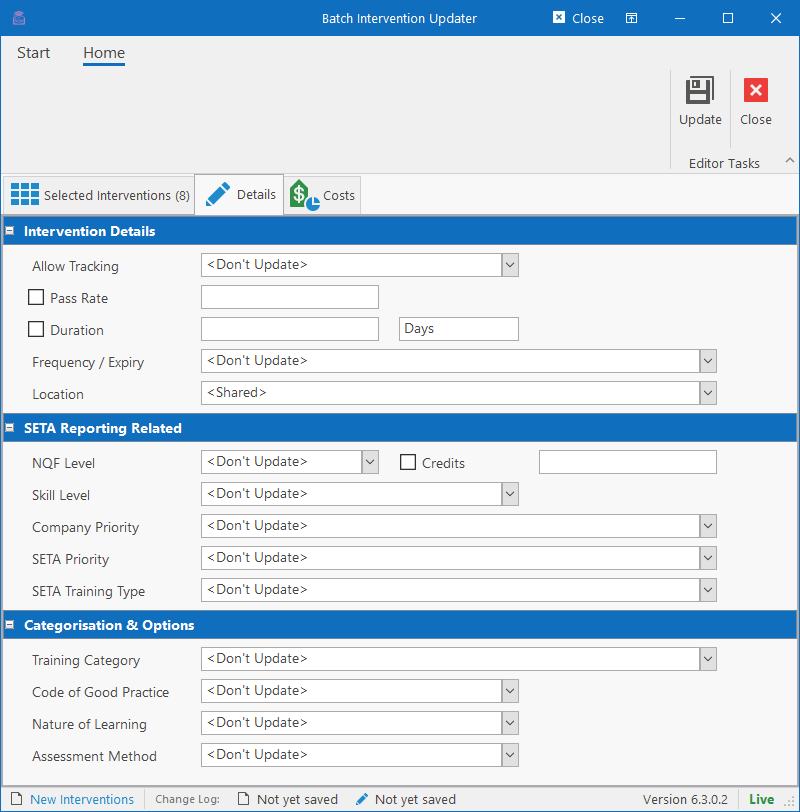
To update a field, simply check the checkbox next to the field that must be updated and enter a new value. For dropdowns, select any value other than “<Don’t Update>”. The selected fields will update and overwrite the values for all the selected training records regardless of their current values.
Selected Interventions tab
This tab will show which interventions are selected and will be updated when clicking the Update button on the ribbon bar. If any intervention should be excluded from the update, it can be removed on this tab.
Costs tab
The Costs tab works exactly the same as the Costs tab on the Intervention Editor, except that each row here has an “Update” column with a checkbox in. Selecting the Update checkbox for a row, will update all the values for that cost category for all the selected interventions, so be sure to capture values for all the columns in that row.
If both the Cost and Rate columns are empty while the Update checkbox is selected for the cost category, then that cost category (and all related information) will be deleted completely for the selected interventions.