
-
HR Manage Application
-
-
- Articles coming soon
-
- Articles coming soon
-
- Articles coming soon
-
-
HR Manage Online
-
Config & Admin
-
IT Documentation
-
Version History
Learning Intervention Library
Introduction
HR Manage uses the term “Learning Intervention” or “Intervention” to refer to a record of any type of training. Thus an intervention can be a course, qualification, unit standard, skills programme and more types of training can be created under the module configuration. Since we don’t hardcode the terminology, the term “interventions” acts as a generic term that refer to all the courses, qualifications, etc.
Getting Started
To access the Learning Intervention Library, open HR Manage and open the “Training” module. Then, on the menu on the left, under the “Libraries & Configuration” section, click on the Learning Interventions item to open the Intervention Library.
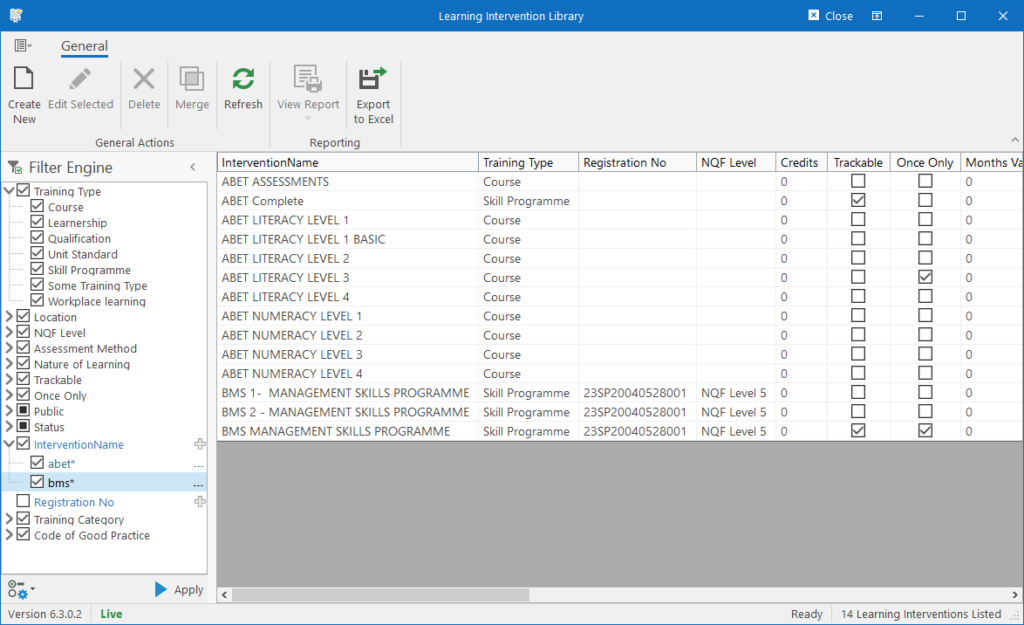
Note that this is an extension of a standard Manager Form in HR Manage. For more information about how to use it, see System Basics / Manager Forms.
Creating & Editing Interventions
To create a new Learning Intervention, click the Create New button on the ribbon bar or simply open an existing intervention to open the Intervention Editor form.
Batch Updating
To update multiple interventions in a batch, select more than one intervention and simply click the Edit Selected button on the ribbon bar or press the Enter key. This will open the Batch Updater.
Deleting Interventions
Deleting interventions is the same as deleting most records in HR Manage. Simply select one or more interventions and click on the Delete button on the ribbon bar, specify how to delete the records and confirm the deletion.