
How Can We Help?
-
HR Manage Application
-
-
- Articles coming soon
-
- Articles coming soon
-
- Articles coming soon
-
-
HR Manage Online
-
Config & Admin
-
IT Documentation
-
Version History
< All Topics
Print
Manage Case Categories
Posted
Updated
Introduction
Cases / Incidents can be placed into categories. Categories are linked to Case Types and can have a single parent category. While this feature is mostly used for classification, there are a couple of behavioural options that can be specified.
Getting Started
Open a Case Type that you want to manage Case Categories for, click on the Case Categories tab and open a category or click the New Category button on the ribbon bar to open the IR Case Category Editor.
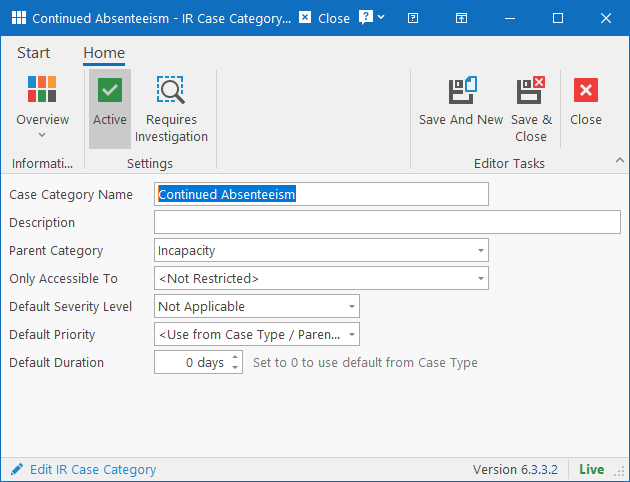
The following fields can be specified:
- Case Category Name: Name used to identify the category.
- Description: More details about what the category is for (up to 200 characters).
- Parent Category: If the category should be a sub-category of another, specify which category should be the parent.
- Only Accessible To: Specify which security group users must belong to in order to view cases in this category.
- Default Severity Level: If specified, it will automatically set the severity level for the case when creating a new one in this category.
- Default Priority: If specified, it will automatically set the priority for new cases in this category. If not specified, the system will check if the Parent Category’s priority is specified and if also blank, the Case Type’s default priority will be used.
- Default Duration: Specify how many days cases in this category typically takes to complete. If set to 0, the system will check the default duration of the Parent Category and if also 0, the system will use the duration set in the Case Type.
Table of Contents