
How Can We Help?
-
HR Manage Application
-
-
- Articles coming soon
-
- Articles coming soon
-
- Articles coming soon
-
-
HR Manage Online
-
Config & Admin
-
IT Documentation
-
Version History
< All Topics
Print
Training Administration
Posted
Updated
Introduction
HR Manage has a comprehensive training management system that consists of managing training events, records, certificates and bursaries / study loans.
Training Dashboard
Open HR Manage and click on the Training button on the ribbon bar or the Training, Certification & Bursaries tile on the main menu to open the Training dashboard. The training specific designed dashboard gives a broad view of what is happening in the training module, but it is possible to design your own grid-based dashboards that will display as different tabs.
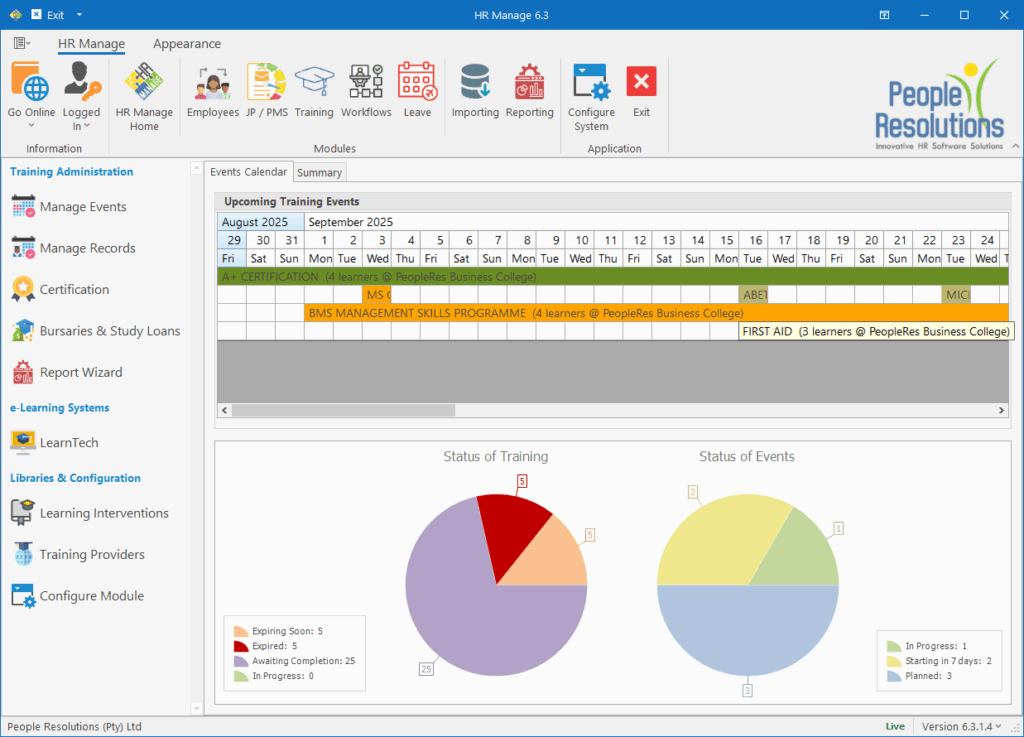
Module Menu
The menu on the left provides access to all areas in the Training module.
- Training Administration: Contains links to the main areas in the module.
- Training Events: Open the Training Event Manager where new training can be scheduled or events can be opened.
- Training Records: Open the Training Record Manager where training records can be opened, printed or updated.
- Certification: Open the Certificate Manager where certificates can be requested, approved and printed.
- Bursary & Study Loans: Open the Bursary Manager where bursaries and study loan applications can be captured and tracked.
- e-Learning Systems: Contains links to e-Learning systems that we’re integrated with.
- Libraries & Configuration: Configure the libraries and training module.
- Learning Interventions: Access the Intervention Library that stores all the courses, qualifications, unit standards, etc. that are used for scheduling training.
- Training Providers: Access the Training Provider Library that stores all the companies that provide training to your company.
- Configure Module: Open the Module Configuration.
Table of Contents