
-
HR Manage Application
-
-
- Articles coming soon
-
- Articles coming soon
-
- Articles coming soon
-
-
HR Manage Online
-
Config & Admin
-
IT Documentation
-
Version History
Managing Assets
Introduction
The Asset Register module provides a centralised and structured way to record, track and manage all company assets throughout their lifecycle. Assets can be assigned to employees, locations, organisational units or external companies / contractors. The module is now a standard module in HR Manage which means that it supports all of the features in the HR Manage ecosystem including custom reports (via the Report Designer) and plugins.
Getting Started
To access the Asset Register, open HR Manage and click on the Asset Register tile on the main menu. This will open the Asset Manager screen where you can filter and view all assets in the company.
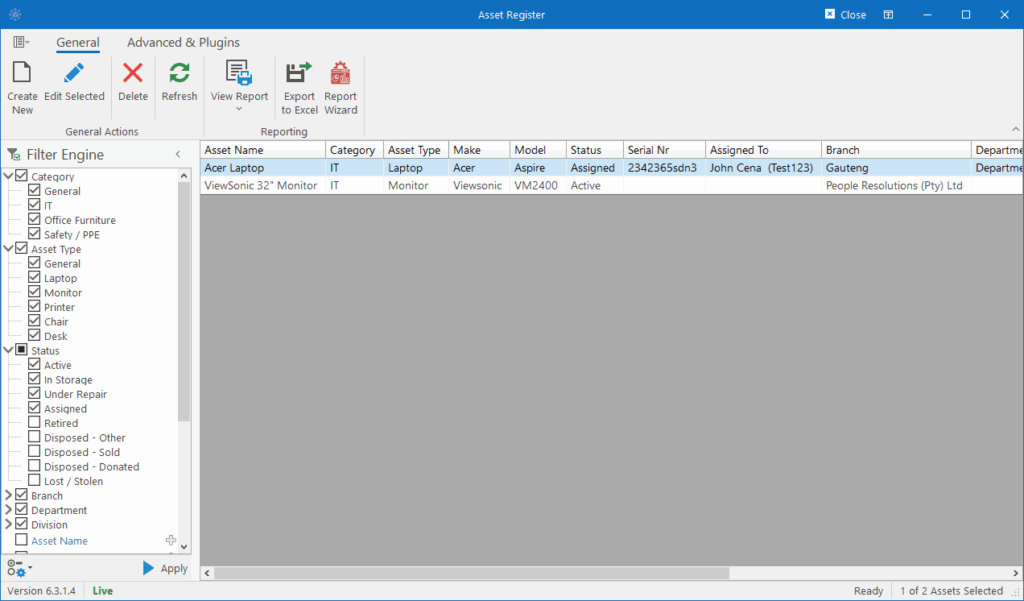
This is a standard Manager Form in HR Manage and for more information on how it works, see System Basics / Manager Forms.
From here, simply open an existing Asset or create a new one to open the Asset Editor.