
-
HR Manage Application
-
-
- Articles coming soon
-
- Articles coming soon
-
- Articles coming soon
-
-
HR Manage Online
-
Config & Admin
-
IT Documentation
-
Version History
Syncing with Payroll
Introduction
HR Manage has two methods available for syncing with payroll.
If HR Manage completely manages the leave, we can send the leave balances back to payroll.
If your payroll manages the leave and accruals, we can send the approved / completed leave applications to payroll and receive the balances back. In this case, we would disable the leave accrual run in HR Manage.
Viewing Sync Results
After performing the “Upload Leave Apps to Payroll” action, if any errors occurred, a new tab with the exception report will appear.
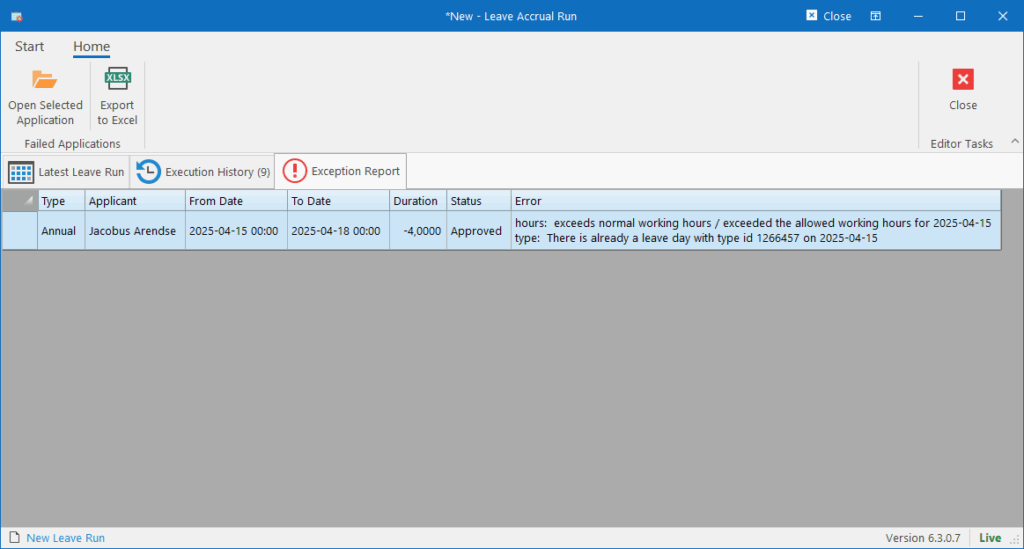
The report will contain the details of the leave applications that were rejected by payroll. They can be opened from here or exported to Excel.
The error column will contain the exact error message received from the payroll.
The payroll run is where HR Manage uploads all the leave applications loaded on the system, to the payroll before the payroll run and then download the latest leave balances after the payroll run.
This screen will show the statistics of the last leave run with the available actions to perform. The actions are enabled / disabled based on the setting in the Leave Module configuration.
The available actions are:
- Start New Leave Accrual Run: This will start the standard leave accrual run based on the rules and entitlement configured in HR Manage.
- Upload Leave Apps to Payroll: This will upload leave applications to payroll that has already been approved or completed. If an application was previously uploaded and has since been cancelled, it will be deleted on the payroll. This should be executed around the 20th of the month before the payroll run.
- Sync Balances from Payroll: This will download the latest leave balances from the payroll and create “Reset Balance” transactions in HR Manage so that the balances match with payroll. This should be executed on or after the 1st of the month.