
-
HR Manage Application
-
-
- Articles coming soon
-
- Articles coming soon
-
- Articles coming soon
-
-
HR Manage Online
-
Config & Admin
-
IT Documentation
-
Version History
Configuring Venues
Introduction
Venues and Rooms are used in HR Manage for specifying where training will be taking place. Each venue has contact and address details and each room defines the maximum number of learners. This is used by the system to determine if there is still space left on a training event.
Getting Started
To manage the venues and rooms in the system, go to the Training module configuration and click on the Venues item on the left menu. This will open the available venues in the system.
From here, open one or click Create New to open the Venue Editor dialog.
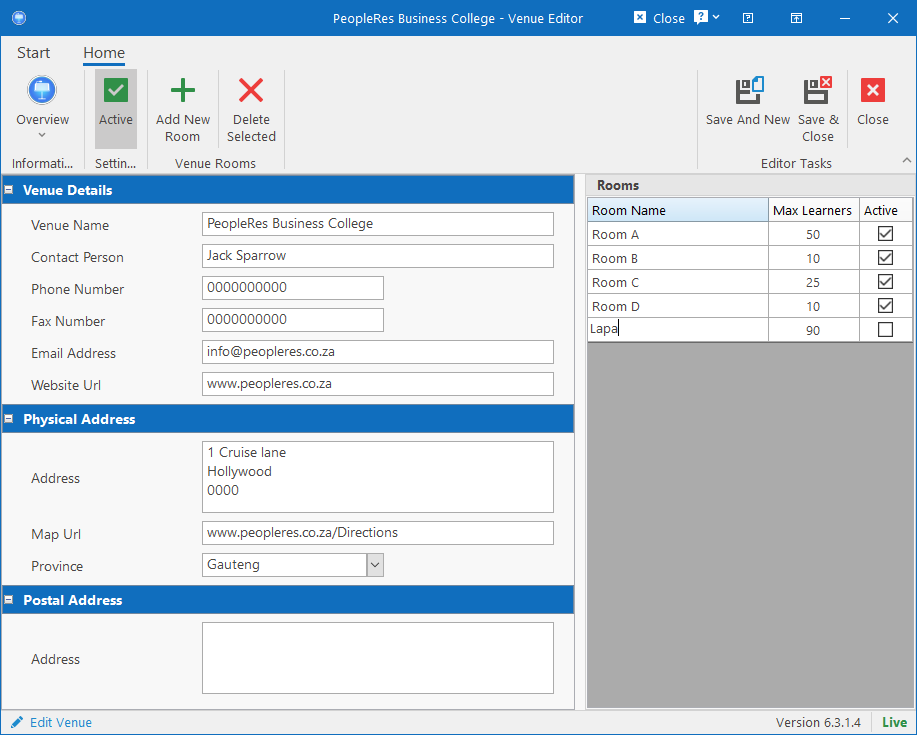
Fill in the fields on the form and be sure to add at least one room in order for the venue to be selectable for training.
To add a room, simply click the Add New Room button on the ribbon bar which will add a new line to the grid and allow you to enter the name and maximum number of learners directly on the grid.
To delete a room, select a room and click the Delete Selected button on the ribbonbar. If the room has already been used by training events / records, you’ll get an error in which case you will have to set the Active column to unchecked to prevent it from coming up for future training.