
Configure Module
Getting Started
Open HR Manage and then open the Training module and click on the Configure Module under the “Libraries & Configuration” section on the left menu. This will open the Training Module Configuration screen where all aspects related to training can be configured.
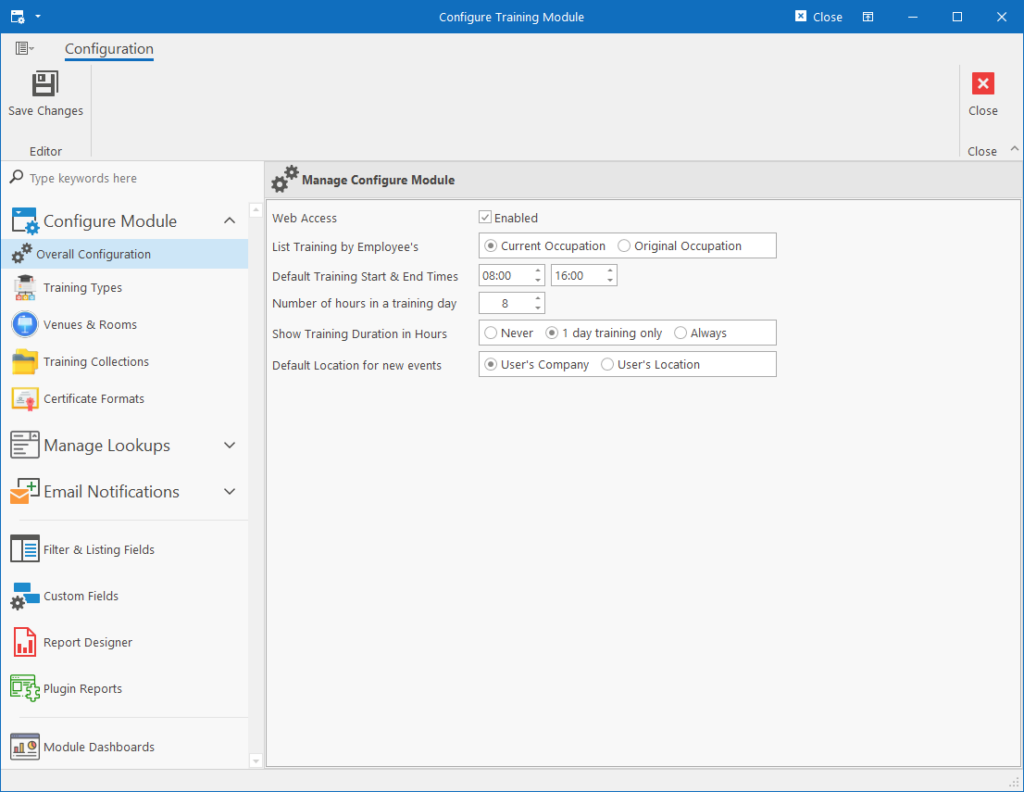
Configuration Areas
The following aspects can be configured:
- Overall Configuration: Contains basic settings and defaults related to the training module (as per screen above).
- Training Types: Define the types of training, security on the types and how they behave in the system.
- Venues & Rooms: Create training venues and rooms that define how many learners can be accommodated for a training event.
- Training Collections: Create collections of training interventions that can be used for checking compliance against employees and generating reports against specific sets of interventions.
- Certificate Formats: Define the rules and approval process for generating certificates as well as the actual design for the certificate (using a visual designer).
Manage Lookups
- Training Lookups
- SETA Training Types
- Training Cost Categories
- Training Event Cancel Reasons
- Completed NSO Reasons: List of reasons why training wasn’t signed off.
- Training Record Cancel Reasons
- Certificate Statuses
- Training Priorities Lookups
- Company Priorities
- SETA Priorities
- Intervention Lookups
- Training Categories
- NQF Levels
- Assessment Methods
- Nature of Learning
- Codes of Good Practice
- Intervention Code Types
- Other Lookups
- Tasklist Categories
- Company Types
Email Notifications
The following email notifications can be configured:
- Notification of New Training
- New Training Request
- Training Request Results
Filter & Listing Fields
The Filter Engine fields and Listing Columns can be configured for the following entities:
- Training Events
- Training Records
- Certificates
- Training Requests
- Bursaries
- Libraries
- Learning Interventions
- Training Providers
- Editors
- Training Event Editor – Records tab (Columns only)
- Training Record Editor – Sub-Records tab (Columns only)
Custom Fields
Custom fields can be defined for Training Events, Training Records, Learning Interventions and Training Providers.
Report Designer
Reports can be designed for all the Manager Forms in the Training module. Newly created reports will appear under the View Report dropdown button in the ribbon bar on the Manager Form that the report was created for.
Plugin Reports
Plugin reports can be created for all Manager Forms in the Training module. This feature is restricted to IT as SQL knowledge is required to retrieve the custom data from the database for use in the report.