
-
HR Manage Application
-
-
- Articles coming soon
-
- Articles coming soon
-
- Articles coming soon
-
-
HR Manage Online
-
Config & Admin
-
IT Documentation
-
Version History
Hearing Types
Introduction
A hearing type forms a step in the process for a case. Each type of case is defined by specifying which types of hearings it can contain and the order in which they are done. For each case, a hearing of each type can only be done once.
Predefined Hearings
We’ve created the following pre-defined hearings:
- Disciplinary Hearing *#
- Counselling Session #
- Grievance Meeting *#
- Internal Mediation #
- Appeal Hearing *#
- External Mediation
- CCMA Conciliation *
- CCMA Arbitration *
- Labour Court *
- Labour Appeal Court *
- Constitutional Court *
Hearing Types marked with * are Formal proceedings and types marked with # are internal / in-house.
Configuring a Hearing Type
Open the Employee Module and click on the Configure Module button on the left menu to open the module configuration screen. On the left menu, under the “Industrial Relations (Disciplinary)” section, click on the Hearing Type item to open the list of defined hearing types. Open the item you wish to configure which will open the Hearing Type Editor.
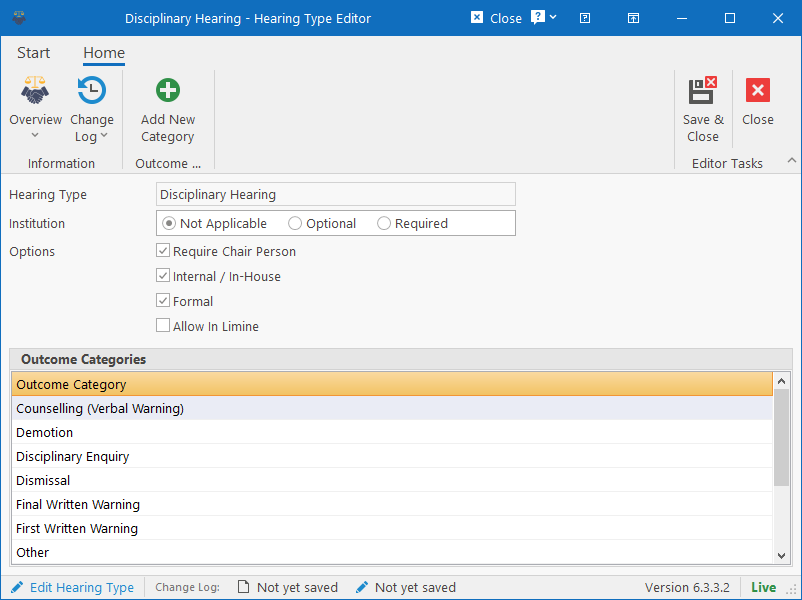
Here you can specify which options apply to the specific type of hearing / process:
- Institution: Specify if an institution must be selected for hearings of this type. If applicable, a field will be made available for selecting an institution from a dropdown when capturing hearings of this type.
- Require Chair Person: Mark as checked if a chair person is required. If checked, a field will be made available for capturing the chair person when capturing details for the hearing.
- Internal / In-House: Mark as checked if the hearing / proceeding / counseling is done internally / in-house.
- Formal: Mark as checked if this is a formal proceeding, leave unchecked if informal.
- Allow In Limine: Specify if In Limine applies to this type of hearing. If checked, then an In Limine type can be specified with comments when capturing details for a hearing of this type.
- Outcome Categories: Add outcome categories that applies to this type of hearing.
When finished, click on Save & Close to save the changes.
To include a specific type of hearing in the process, then the hearing type should be included in the Case Type (i.e. Disciplinary). For more information, see the Case Type Editor.