
-
HR Manage Application
-
-
- Articles coming soon
-
- Articles coming soon
-
- Articles coming soon
-
-
HR Manage Online
-
Config & Admin
-
IT Documentation
-
Version History
Managing Results
Introduction
After an import has completed, the results of that import can be inspected, fixes can be made and failed records can be reimported. To view the results, select the import template in the Importing module and click on the Manage Results button in the ribbon bar.
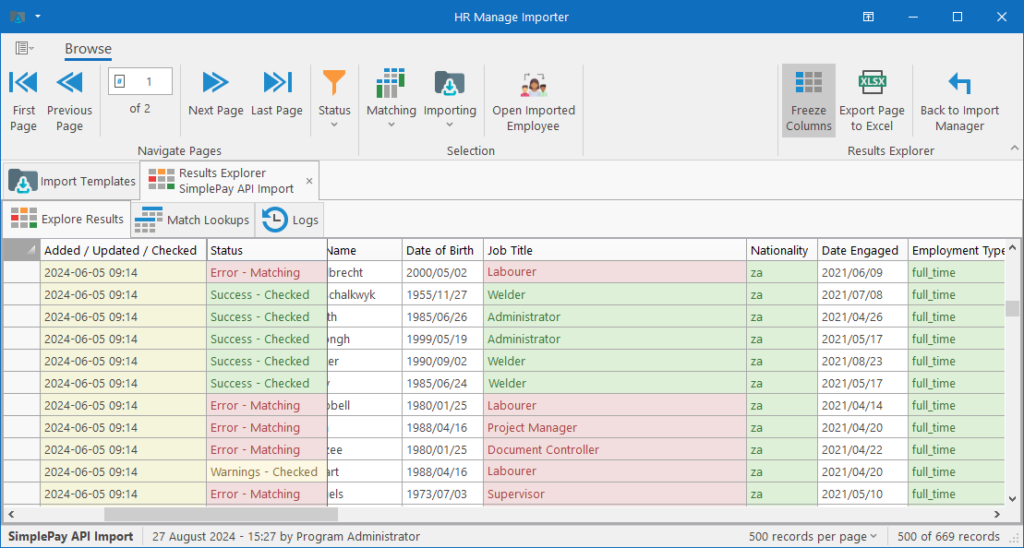
The table / grid consists of a number of informational columns like Date Added, Status, New (checkbox), Date Processed and Result. The rest of the columns are based on the column mapping configuration in the import template.
Every row has an overall status (show in the “Status” column) and each column also has a status represented in one of 4 colours. The status for each column is determined based on the rules configured in the import template and the content of the source data. The statuses are:
- Black & White = Normal
- There are either no validations for the column or no errors found.
- Green = Valid / Success
- Usually only apply to lookup fields that has been matched. Other types of fields with no errors would generally be black & white.
- Yellow / Orange = Warning
- An example of this would be where a non-critical field was not matched for a new record and the default value was used instead.
- Red = Invalid / Error
- A column marked in red would be the reason why the whole row failed to import.